
Quick Summary
Many website owners assume that every growing project will eventually require a VPS, especially after the first performance issues.
In reality, modern shared hosting supports far more than small websites. Corporate websites, blogs, service-based businesses, and many WooCommerce stores can run on shared hosting for years without significant limitations.
The key factor is workload, not traffic. A well-optimised website with proper caching may handle substantial traffic on shared hosting, while another reaches limits much earlier because of heavy plugins, complex database queries, integrations, or background tasks.
Performance issues do not automatically mean that shared hosting has reached its limits. The same symptoms can be caused by an oversized database, inefficient plugins, poor caching, or configuration problems, regardless of hosting type.
A VPS becomes necessary only when the current hosting environment can no longer handle the project’s technical or resource requirements. The decision should be based on measurable limitations, not on the size or perceived importance of the website.
How Modern Shared Hosting Actually Works
Many people still imagine shared hosting as it was 10–15 years ago, when hundreds of websites shared one server and a single overloaded account could slow everything down.
Modern shared hosting works differently. Although customers still share the same physical server, technologies such as CloudLinux isolate accounts and enforce individual CPU, RAM, Entry Process, and I/O limits, preventing one website from affecting others.
What a Shared Server Really Means
Each hosting account receives its own allocated resources. As long as a website stays within its limits, neighbouring accounts have minimal impact on performance.
How CloudLinux Solves the “Noisy Neighbour” Problem
CloudLinux tracks resource usage per account. If one website generates excessive load, only that account is restricted, while the rest of the server continues operating normally.
Resource Limits in Practice
| Resource | What It Controls | When the Limit Is Reached | Business Impact |
| CPU | PHP execution and database queries | Higher TTFB | Slower page generation |
| RAM | PHP, MySQL, caching | PHP errors or terminated processes | Unstable site or admin area |
| Entry Processes | Concurrent requests | Requests are delayed or rejected | Errors during traffic spikes |
| I/O | Disk operations | Slower file and database access | Slower search, imports, backups |
Actual limits vary between providers, but every account has defined allocations to prevent a single website from consuming all server resources.
Why These Limits Matter
Every page request uses CPU, memory, and I/O while PHP executes and database queries run. Limits ensure one busy website does not affect others.
Entry Processes are especially important for WooCommerce, where checkout, search, API calls, and background tasks often run at the same time. I/O performance directly affects imports, backups, catalogue updates, and cron jobs.
Which Projects Are Usually Fine on Shared Hosting?
Learning about CPU limits, RAM allocations, and Entry Processes often creates the impression that every serious website eventually needs a VPS.
In reality, most websites never reach the limits of modern shared hosting. For these projects, infrastructure quality and proper optimisation matter more than the hosting model itself.
Where Shared Hosting Is Usually Enough
| Project Type | When Shared Hosting Is Usually Sufficient | When a VPS Becomes Worth Considering |
| Corporate or service website | In most cases | Complex integrations, client portals, or custom services |
| Blog or content site | Often for many years with proper caching | Inefficient caching or heavy additional services |
| Landing page or portfolio | Almost always | Specialised processing or custom functionality |
| WooCommerce store | Hundreds or thousands of products with moderate traffic | Large catalogues, advanced filtering, integrations, or heavy background processing |
Corporate websites, service businesses, blogs, landing pages, and portfolio sites typically generate low to moderate server load. Most content is cached or requires minimal database activity, allowing these projects to run on shared hosting for long periods without issues.
WooCommerce is often misunderstood in this context. Many stores operate successfully on shared hosting even with large catalogues. The real driver of resource usage is not product count, but search, filtering, imports, integrations, and background processes.
For most projects, migration should be based on measurable resource usage rather than traffic or perceived business scale. If CPU, RAM, Entry Process, and I/O limits are not consistently reached, shared hosting remains the most practical and cost-efficient option.
What Actually Creates Server Load
One of the biggest misconceptions when choosing hosting is focusing only on visitor numbers. Servers process requests, database queries, PHP execution, and background tasks, not visitors themselves.
This is why a blog with 10,000–15,000 daily visits can run comfortably on shared hosting, while an online store with only a few hundred visitors may reach CPU, RAM, or Entry Process limits.
What Typically Generates Server Load
| Source of Load | What Happens on the Server | Typical Impact |
| WooCommerce | Cart, checkout, session handling | Very high |
| Catalogue search | Complex database queries | High |
| Product filters | Large dynamic queries | High |
| Product imports | Bulk database writes | High |
| Cron jobs | Background processing | Medium to high |
| External APIs | Third-party requests | Medium |
| Resource-heavy plugins | Additional PHP + database load | Medium to very high |
| Cached content | Pre-generated pages | Low |
A cached website mostly serves pre-generated pages with minimal PHP and database activity. In contrast, WooCommerce stores constantly execute dynamic operations such as search, filtering, cart updates, checkout processing, and stock management. As a result, similar traffic levels can create completely different server loads.
Background tasks such as imports, synchronisation, backups, and cron jobs often generate more load than frontend traffic. External integrations with CRMs, payment systems, shipping providers, and marketplaces add additional pressure, while a single inefficient plugin can become the main performance bottleneck.
Early Signs That Shared Hosting Is Becoming a Limitation
Websites rarely outgrow shared hosting overnight. Performance usually declines gradually as resource usage increases. At the same time, slow performance does not automatically mean a VPS is required. Heavy plugins, inefficient code, oversized databases, or poor CMS configuration can produce similar symptoms, so application issues must be separated from hosting limitations.
Common Signs That Shared Hosting Is Reaching Its Limits
| Symptom | What Is Usually Happening | What to Check |
| Rising TTFB | Server response times increase | CPU usage and peak traffic |
| HTTP 503 errors | Resources are exhausted | CPU and Entry Process limits |
| Slow admin area | Backend operations slow down | Database and PHP performance |
| WooCommerce delays | Cart and checkout slow | MySQL load, filters, search |
| Failed cron jobs | Background tasks fail | Task queues and cron logs |
| Import failures | Scripts exceed limits | PHP logs, memory usage |
Increasing TTFB and recurring HTTP 503 errors are usually the earliest indicators that available resources are becoming insufficient, especially during traffic spikes or marketing campaigns. Limitations often appear first in the administration area, where logging in, saving content, or processing WooCommerce orders becomes noticeably slower.
Delayed cron jobs, failed imports, and growing task queues indicate that background processes no longer have enough resources to complete reliably.
These symptoms should not automatically trigger a VPS migration. If issues appear immediately after installing a plugin or changing functionality, the cause is more likely inefficient code, database queries, or application design.
Before upgrading, it is important to review resource usage, CPU and memory statistics, and error logs. A VPS becomes appropriate only when resource limits are reached consistently and further optimisation no longer produces meaningful improvements.
When Moving to a VPS Is Actually Justified
Many website owners assume that every growing project will eventually require a VPS. In reality, the decision depends not on traffic or website age, but on whether the current hosting environment can handle the workload.
When a VPS Makes Sense — and When It Doesn’t
| Situation | VPS Usually Makes Sense | VPS Usually Doesn’t |
| CPU limits are reached regularly | Yes | No |
| HTTP 503 errors appear repeatedly | Yes | No |
| RAM shortages continue after optimisation | Yes | No |
| Large WooCommerce store with heavy activity | Often | Not always |
| One-off traffic spike | No | Yes |
| Plugin or database-related slowdown | No, optimise first | Yes |
| Heavy imports, API integrations, background jobs | Often | No |
Repeated CPU exhaustion, HTTP 503 errors, RAM shortages, and slow administration areas usually indicate that shared hosting no longer provides sufficient resources. This is especially common in WooCommerce stores with large catalogues, complex filtering, multiple integrations, and heavy background processing.
Projects that depend on APIs, imports, scheduled tasks, or reporting systems often benefit from the more predictable CPU and memory allocation of a VPS.
However, a VPS does not replace optimisation. Inefficient plugins, slow database queries, and poor application design remain problems regardless of the hosting platform.
A VPS becomes a real technical requirement only when resource limits are reached consistently despite reasonable optimisation, and those limitations begin affecting users, orders, or critical business processes.
When a VPS Is Needed Regardless of Traffic Levels
Most VPS migrations are driven by resource limits. However, some projects require a VPS regardless of traffic because of their architecture rather than workload.
Shared hosting is designed for standard websites with a predefined software stack and limited system configuration. A VPS becomes necessary when an application requires full control over the server environment.
When Root Access Becomes Essential
Projects that depend on custom Linux packages, Redis, Elasticsearch, Docker, specific versions of Python, Node.js or PostgreSQL, or custom Nginx/Apache configuration require capabilities that shared hosting cannot provide.
Redis reduces database load, while Elasticsearch enables advanced search for large catalogues. Docker is commonly used for microservices, automation, bots, and monitoring tools, and Node.js applications often rely on persistent processes and WebSocket connections. These workloads require system-level access that shared hosting does not allow.
The same applies to custom Python environments, PostgreSQL extensions, machine-learning libraries, and continuously running background services.
Projects That Commonly Start on a VPS
SaaS platforms, CRM and ERP systems, API services, Docker-based applications, Node.js projects, Elasticsearch-powered search systems, Telegram bots, and internal business tools are typically deployed on a VPS from the beginning because they require full control over the environment rather than additional resources.
For these projects, architecture—not traffic—is the deciding factor.
What a VPS Gives You Beyond More Resources
Many people see a VPS simply as a way to get more CPU and RAM. While resource limits often trigger the move, the long-term value comes from control, predictability, and flexibility rather than raw performance.
What Changes After Moving to a VPS
| Capability | Shared Hosting | VPS |
| Server environment configuration | Limited | Full control |
| Custom software installation | Usually unavailable | Available |
| Persistent services | Limited or unavailable | Fully supported |
| PHP, MySQL, Nginx configuration | Partial control | Full control |
| Redis, Elasticsearch | Provider-dependent | Full control |
| Resource scaling | Fixed plans | Flexible |
| Isolation from other customers | Partial | High |
| System updates | Provider-managed | Server owner-managed |
Shared hosting provides a predefined environment managed by the provider, while a VPS removes most restrictions and allows full control over software versions, system packages, web server configuration, and database tuning.
This becomes important for WooCommerce stores, API platforms, and applications that require custom PHP-FPM settings, database optimisation, or services such as Redis, Elasticsearch, queues, or background workers.
A key advantage is predictability. Even with technologies like CloudLinux, shared hosting still operates on a shared physical layer, while a VPS provides dedicated CPU and memory, resulting in more consistent performance under load.
Scalability is another benefit, as CPU, RAM, and storage can usually be expanded without migrating to another platform.
A VPS does not fix inefficient code, slow SQL queries, or poor application architecture, but it provides full control for diagnosing and optimising these issues.
Ultimately, the main advantage of a VPS is not additional resources, but the ability to control and adapt the server environment as the project evolves.
How to Tell Whether the Problem Is Not the Hosting
When a website becomes slow, many owners assume the hosting plan is too small and consider moving to a VPS. Sometimes that is the right decision. In many cases, however, the bottleneck is inside the application rather than the hosting environment.
Resource-heavy plugins are a common cause, especially on WordPress and WooCommerce websites. A single inefficient plugin can generate enough database queries and background tasks to create more load than the hosting itself.
Database growth, leftover plugin data, and recurring PHP errors can also slow a website even when CPU and memory usage remain relatively low.
Without proper page and object caching, every request rebuilds pages through database queries, significantly increasing server load.
WooCommerce exposes these issues particularly well. Filters, search, variations, pricing rules, and third-party integrations can overload even a powerful VPS if the application is poorly optimised.
If performance improves only briefly after adding resources, CPU and memory usage remain low, or only search, filtering, checkout, or the admin area are slow, the bottleneck is likely inside the application. The same often happens after installing a plugin, updating a theme, or enabling a new integration.
Before migrating, review PHP logs, database performance, caching, and plugin activity. In many cases, the problem is not the hosting.
A VPS helps only when the hosting environment has genuinely reached its limits. It cannot fix inefficient code, slow SQL queries, or poor application architecture, so diagnosis should always come before migration.
Why Timing Matters More Than the VPS Itself
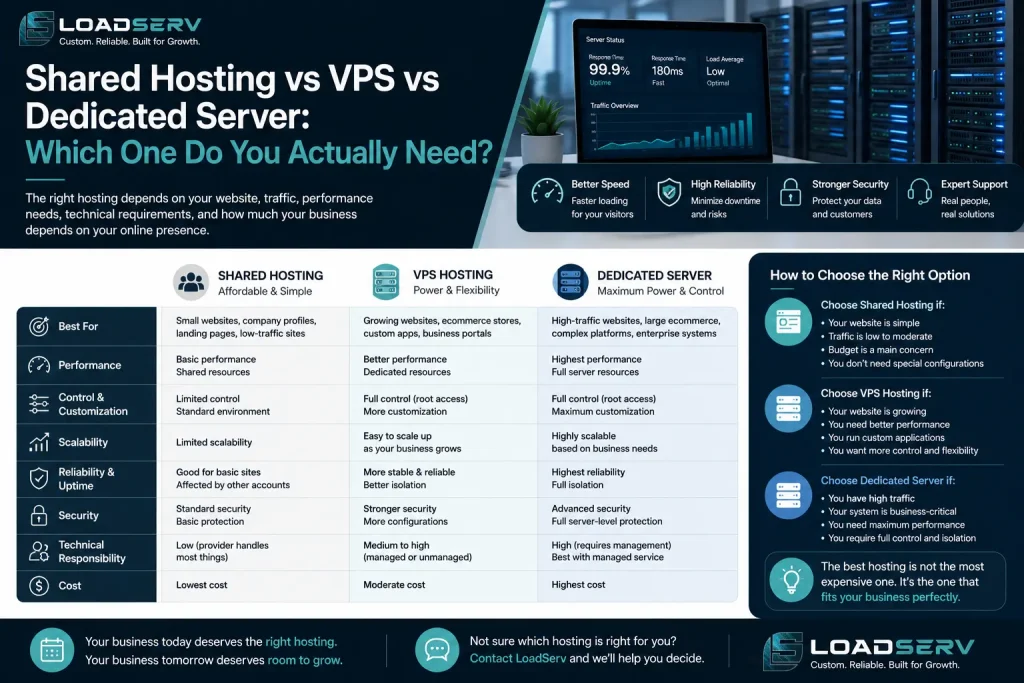
Many website owners assume infrastructure always follows the same path: shared hosting first, then a VPS, and eventually a dedicated server. In reality, every project develops differently.
Shared hosting is not just a starting point. Corporate websites, blogs, service businesses, landing pages, content-driven projects, and many online stores can operate successfully on quality shared hosting for years. Likewise, a VPS is not a mandatory milestone. If performance problems are caused by inefficient plugins, slow SQL queries, PHP errors, or missing caching, migrating to a VPS will not solve them.
The opposite situation is equally common. Some projects remain on shared hosting long after rising TTFB, recurring HTTP 503 errors, slow WooCommerce performance, delayed imports, or overloaded background tasks indicate that available resources are no longer sufficient. Others move to a VPS too early and gain little beyond additional administrative overhead.
A VPS becomes the right choice when there are clear technical reasons, such as recurring CPU or memory limits, sustained database load, intensive background processing, demanding integrations, or the need for full control over the server environment. Without these requirements, it often solves a problem that does not exist.
Based on our experience at Era.Host, many websites that appeared to require a VPS were actually limited by inefficient plugins, database queries, or missing caching. For that reason, we recommend reviewing CPU, RAM, Entry Process, and database usage before suggesting a migration. Projects that consistently reach these limits can then move to VPS infrastructure with clear technical justification.
The key question is not whether a website is important enough for a VPS, but whether the current hosting environment still meets its technical requirements. The best hosting solution is not the most powerful or the most expensive one, but the one that matches the project’s workload while leaving enough room for future growth. When migration is based on measurable limitations rather than assumptions, a VPS becomes a justified investment rather than an unnecessary upgrade.